

How to Introduce Coordinate Coding with a Simple 2 by 3 Grid Layout
Posted by Geyer Instructional Products on 9th Jul 2026
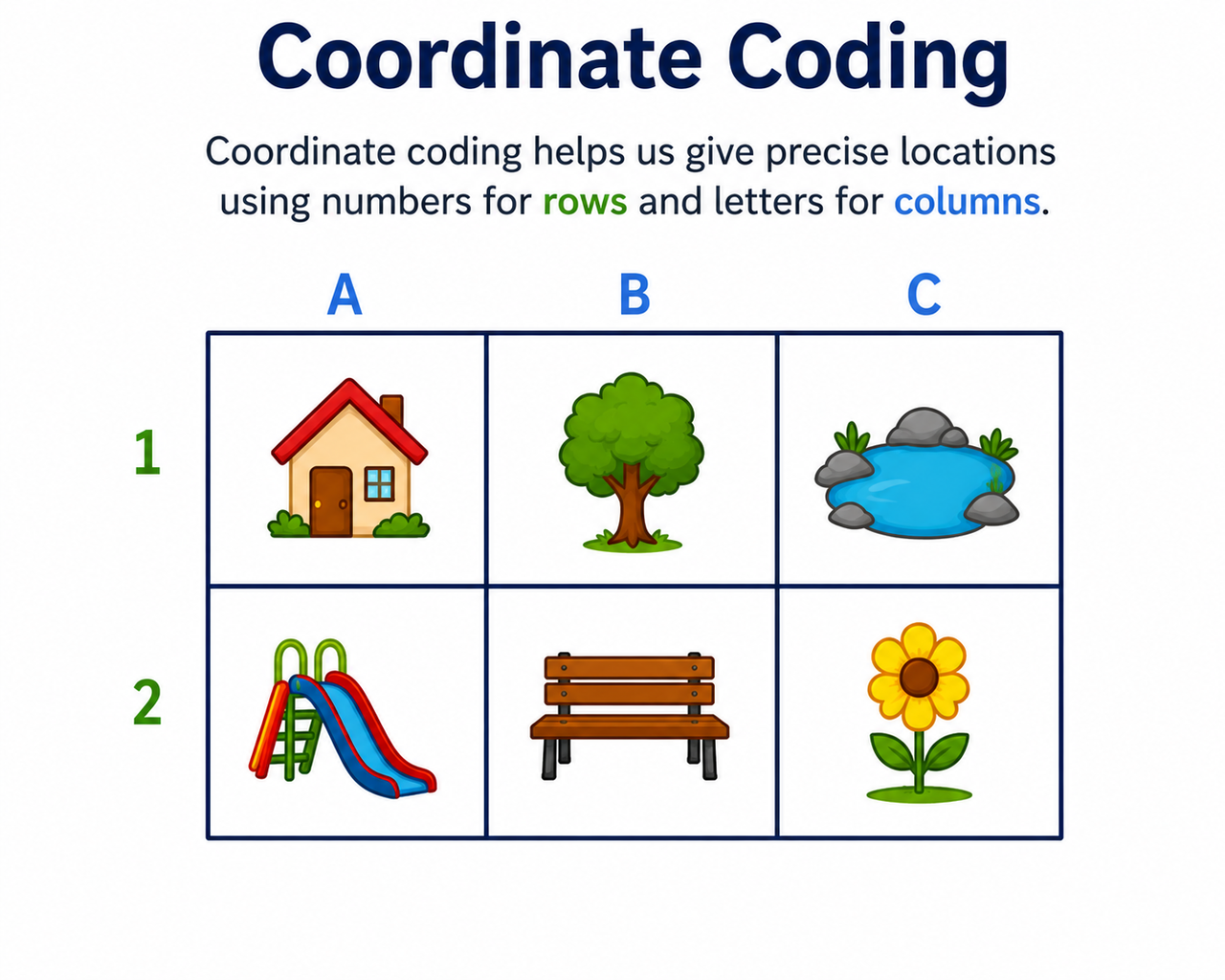
Teaching coordinate coding doesn't require a screen, a login, or a coding app. A 2 by 3 grid - six squares on a piece of graph paper or a dry-erase board provides a simple way to introduce foundational algorithmic thinking
Most lessons start too large. That's the real problem.
In elementary classrooms using printed coordinate grids, teachers hand students a full coordinate plane, and within minutes, half the class is lost counting squares instead of thinking logically. Shrinking the grid fixes that.
Why Most Coordinate Coding Lessons Start Too Big
Here's the contrarian take most coding guides skip: the grid size is the lesson.
When you give a young learner a 10x10 coordinate grid, you haven't simplified coding - you've added a math task on top of it. The student now has to count rows, count columns, track two-digit numbers, and still figure out directional logic. That's four cognitive demands at once.
The Screen-to-Desk Disconnect Nobody Mentions
Screen-based coding tools for early grades - even the well-designed ones - add friction that has nothing to do with programming logic. Students deal with login steps, interface navigation, and accidental clicks before a single algorithm runs.
Physical tools remove all of that. A printed coordinate grid paper sheet or a desktop dry-erase board puts the entire problem in front of the student at a glance. No tabs. No loading screens. No syntax errors.
That's the environment where directional thinking actually takes hold. If you want a broader look at how graphing paper supports foundational math and STEM skills, the post on what graph paper is used for in math and STEM learning covers that well.
What Does a 2x3 Grid Look Like and How Do You Set It Up?
The setup takes under two minutes.
Draw or print a grid with three columns and two rows. Label the columns 1, 2, and 3 along the top. Label the rows 1 and 2 down the left side. You now have six squares, each with a unique address.
Labeling the Grid the Right Way for Young Learners
Labeling columns first helps reinforce the convention of reading coordinates as (x, y), with the horizontal position before the vertical position.
For physical tools, any of the following work well:
- Printed grid paper sheets for individual seat work
- A grid paper notebook for students to track multiple attempts
- A desktop dry-erase board for repeated use without paper waste
- Larger square paper grid formats with raised edges for special education settings
The distinction between general graph paper for math and coordinate grid paper matters here. Standard graph paper has uniform squares for drawing or measuring. Coordinate grid paper typically includes or is designed to support labeled axes, making it easier for students to work with ordered pairs.
How Do You Run a 2x3 Coordinate Coding Lesson Step by Step?
This progression works for grades K-3. Each phase builds on the one before it.
Phase 1 and 2 - Build the Address System, Then Add Command Cards
Place a game token in the top-middle square. Ask students: What is this square's address? Walk them through reading the column first, then the row. That square is (2, 1).
Move the token to different squares and repeat until reading coordinates feels automatic.
Then introduce four physical arrow cards:
- Move East (Right)
- Move West (Left)
- Move North (Up)
- Move South (Down)
One card equals one square of movement. That's the whole rule.
Phase 3 and 4 - Map a Path, Then Run It
Place a start token at (1,2) - the bottom-left square. Place a target token at (3,1) - the top-right square. Students lay arrow cards in sequence on their desk to map a path from start to finish. Then a second student acts as the "processor." They pick up the start token and follow the arrow cards one by one, physically moving it across the coding coordinate grid.
If the token reaches the target, the program runs correctly. If it hits an edge or misses the target, stop. Trace the path. Find the wrong card. Swap it out.
That moment of tracing and fixing; that's debugging. Students just did it without knowing the word.
Physical Grid Coding vs. Screen-First Coding - What the Research Shows
Research by Marina Umaschi Bers and colleagues has shown that tangible programming activities can support the development of computational thinking and sequencing skills in young children before they transition to screen-based programming. The physical manipulation of objects helped children internalize sequencing logic before abstract syntax was introduced.
A Side-by-Side comparison of a typical classroom experience
| Learning Metric | Screen-First Coding | Physical Grid Coding |
|---|---|---|
| Cognitive Load | High - UI, logins, syntax errors compete for attention | Low - students focus only on directional logic |
| Error Diagnosis | Error codes confuse young learners | Students trace the path with a finger and spot the mistake |
| Social Dynamics | Individual, screen-centered work | Collaborative - one student maps, one executes |
| Kinesthetic Memory | Limited to clicks and keystrokes | High - objects move, hands engage, paths are physical |
Once students internalize the logic on a physical grid, the same thinking transfers cleanly to any screen-based environment. That's the sequence that actually works.
Three Advanced Concepts You Can Teach on Just Six Squares
Most articles stop at basic movement. These three ideas push further - all within the same six-square layout.
Debugging, Optimization, and If-Then Logic Without a Screen
Debugging: Deliberately place a wrong arrow in the sequence. When the token reaches the edge and "falls off," students stop, find the incorrect card, and swap it. They just debugged a program.
Optimization: Ask students to find two different paths from (1,1) to (3,2). Once they've mapped both, ask, "Which one uses fewer cards?" That's algorithmic efficiency - introduced without a single line of code.
Conditional Logic: Place a small block on square (2,1). Give students this rule: "Move to column 3 - but IF that square is blocked, THEN go around through row 2." That is an if-then statement. Students just modeled conditional logic.
The small grid is what makes all three possible. Fewer squares means more mental bandwidth for the logic itself, not for counting.
What Tools Work Best for This Lesson in a Real Classroom?
Printed tools work well for individual seat work and take-home practice. Reusable tools work better for repeated classroom sessions.
Printed vs. Reusable - Which to Choose
Printed options:
- Graph paper pads or loose sheets - inexpensive, disposable, good for one-off sessions
- Grid paper printable sheets - easy to customize grid size or add pre-labeled axes
- A grid paper notebook - lets students document multiple path attempts across several lessons
Reusable options:
- Desktop dry-erase grid boards - ideal for daily use without paper waste
- Laminated coordinate grid paper sheets with dry-erase markers
For special education classrooms, larger square formats with tactile markers make the coordinate system more accessible. Geyer Instructional carries both printed and reusable grid tools designed specifically for classroom instruction.
Frequently Asked Questions
What is grid paper used for?
Grid paper is used for math graphing, data plotting, geometry, and unplugged coding lessons. The pre-drawn squares give students a visual structure for organizing numbers, coordinates, and paths without drawing their own.
How do coordinates work in coding?
In coding, coordinates identify the exact position of an object on a grid or screen. Most systems use two values - one for horizontal position (x) and one for vertical position (y) - written as (x, y). Teaching this with a physical grid first makes the concept concrete before any syntax is introduced.
How do you make a graph in coding with coordinates?
In most beginner coding environments, you define a grid or canvas, then use coordinate pairs to place or move objects. For example, moving a sprite to position (3, 1) places it in column 3, row 1. Practicing this on paper first removes the screen barrier and helps students visualize the coordinate system clearly.
How do you use grid paper in math?
Grid paper helps students plot points, draw geometric shapes, visualize fractions, and organize equations. In early grades, it also supports skip counting and multiplication arrays. The labeled version - coordinate grid paper - adds axis structure and works directly for graphing and coding prep.
Can a 2x3 grid really teach real programming logic to young children?
Yes, and it often does it better than larger grids. The limited space forces students to focus on sequence, direction, and error-tracing rather than counting. Debugging, optimization, and conditional logic are all teachable within six squares. The grid size doesn't limit the concept. It clarifies it.
 Recently Viewed