
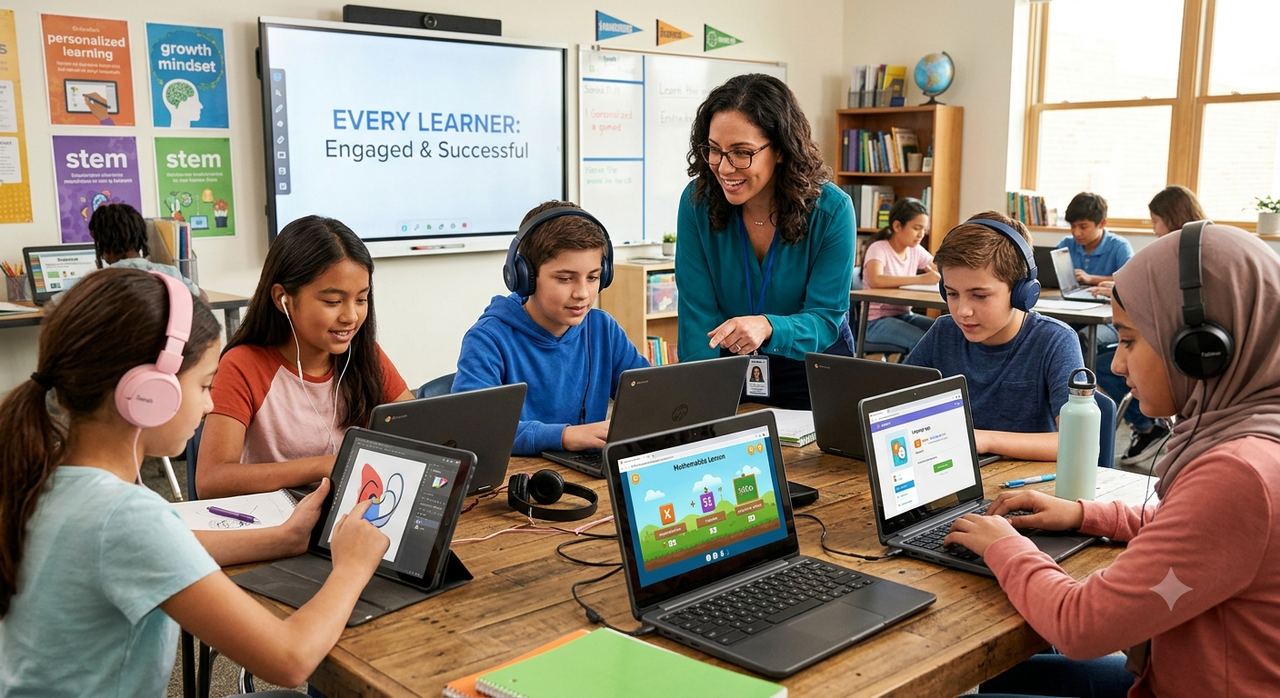
The Page, the Screen & the Headphones Teaching to Every Learner
6th Oct 2026
Should a teacher rely on worksheets, tablets, or audio guides? There isn't one format that works best for every student, concept, or classroom. Research doesn't back the idea that kids have a fixed "visual" or "auditory" learning style, but it does support giving students more than one way to access, work through, and show what they know.
We've shipped a composition notebook for lab journaling into plenty of classrooms, alongside robotics mats and graphing tools. Watching how departments combine these tools is where this piece comes from.
Why "Pick One Learning Style" Is Outdated Advice
The idea that every student is a “visual learner” or an “auditory learner” remains common in education. It's a tidy idea. It's also not well supported by the research on how students actually learn.
What the evidence does support is variety. Providing more than one way to engage with a concept can give students additional opportunities to access and understand the material. That doesn't mean every lesson needs all three, or that they have to happen in a fixed order. It means having more than one option available matters.
The Multi-Modal Modality Matrix
Here's how we break the three channels down when we're helping a department plan out a unit:
| Instructional Channel | What It Provides | Best Use Case in the STEM Classroom | Example Tooling |
|---|---|---|---|
| The Page | Physical interaction & written representation | Spatial reasoning, graph plotting, hands-on manipulatives, lab journaling | Dry-erase grid boards, geometric solids, fraction tiles, a classroom notebook |
| The Screen | Visual & interactive representation | Dynamic data visualization, step-by-step simulations, geometry modeling | Interactive whiteboards, digital balance software, STEM simulations |
| The Headphones | Audio & verbal representation | Guided audio instructions, read-aloud support, translation, podcasts | Audio headsets, listening stations, text-to-speech devices |
None of these channels replaces another, and none is required to come before or after the others. Think of them as three separate doors into the same room. Which door a student uses can change lesson to lesson, or even day to day.
How Does Multi-Sensory Instruction Support Retention?
Short answer: it gives students more than one way to encounter the same idea. A student who only reads a definition has one way in. A student who can also see it and hear it has more chances to connect with it.
What UDL Actually Says
Universal Design for Learning isn't a step-by-step sequence. It's built around three principles: multiple means of engagement, multiple means of representation, and multiple means of action and expression. The page, screen, and headphones map loosely onto representation, and a mix of tools can also support the third. None of it requires a fixed order. (Source- https://udlguidelines.cast.org/ )
What a 2024 Classroom Study Found
A 2024 study published in Interactive Learning Environments tested tangible, multisensory interfaces with primary school students. The researchers found that children recalled more information when a learning interface included multisensory materials, compared with a single-sense version of the same material. The study supports the general benefit of multisensory input on recall. It does not test or claim a specific sequence like page-then-screen-then-headphones. Full study: tandfonline.com/doi/full/10.1080/10494820.2024.2427277.
What the Page Offers
Physical tools give students something to hold and rearrange. A fraction tile a student can pick up builds a kind of spatial familiarity a picture on a screen doesn't quite match.
This is also where journaling earns its keep. A student who sketches a graph by hand, labels the axes, and writes a one-line conclusion is working through the idea differently than one who fills in a digital form. Dry-erase grid boards and geometric solids do the same job for math and geometry units.
What the Screen Offers
Digital tools let students test ideas quickly. A student can change a variable, watch the outcome shift, and try again in seconds, without waiting on physical setup.
Interactive whiteboards and simulation software let a class test several scenarios in the time it takes to draw one by hand. Digital balance tools work the same way for measurement units, letting students see cause and effect without real lab equipment. For teachers building a supply kit that spans physical and digital tools, our earlier post on The Teacher's Loadout: What's Actually in a Great Teacher's Bag covers how to pack for both without overloading a cart.
What the Headphones Offer
Audio can lower a barrier for some students. Audio can give students another way to access an explanation without relying exclusively on written text.
A set of blue deluxe headphone units at a listening station can help a struggling reader or an English language learner hear a concept explained clearly, without the added strain of reading it cold. It's one option among several, not a guaranteed fix, and it tends to help most when paired with the same content in another format.
Putting It Together in a Lesson
There's no single formula here. Depending on the concept and the class, a lesson might use one of these tools, two, or all three, in whatever order fits that day:
- Physical models or a graphing board, for students to handle and compare directly.
- A screen simulation, for testing variables and seeing outcomes change.
- Recorded explanations or audio prompts, for independent review or extra support.
- A flexible way to show understanding, whether that's drawing, building, explaining out loud, or presenting digitally.
The point isn't a set order. It's making sure students have more than one way to reach a concept, and more than one way to show they've got it.
Where Multi-Modal Teaching Gets Overlooked
Two tools get underrated in this conversation. First, the plain composition notebook. It's an inexpensive, low-tech option for lab journaling and reflection between digital sessions. Second, film. A well-chosen science documentary can work as both a screen and an audio input at once, especially for younger students who need a story to hang a concept on.
Frequently Asked Questions
How big is a composition notebook?
Sizes vary by manufacturer, but a common size is around 7.5 by 9.75 inches. Sheet count, cover material, and binding also differ between brands, so it's worth checking the specific product before ordering in bulk.
What is a composition notebook?
It's generally a bound notebook, often with a stitched rather than spiral binding and a stiffer cover than a standard notebook. Many teachers use them for lab notes because that binding makes pages harder to lose.
What are good science movies for kids to pair with a lesson?
Look for short documentaries showing real experiments rather than dramatized reenactments. Good stem movies tend to hold a 4th grader's attention for 20 to 30 minutes without losing the science.
Is there one good movie to introduce science to 4th graders?
There's no single right answer, but something built around one clear question, like how weather forms, tends to work well. A movie to introduce science to 4th graders works best when it ends with a question the class can test themselves.
Do you need all three modalities in every single lesson?
No. Some concepts only need one format. Save a mix of formats for concepts students tend to lose track of between units.
How do we start building a multi-modal classroom on a budget?
Pick one area and build it out first. Many departments start with physical manipulatives, since they're reusable year over year. Add screen tools next, then audio stations as the budget allows.
 Recently Viewed